|
 Patient Signposting
Patient signposting allows patients to be directed to the most appropriate care pathway based on the content of their free text request.
For example, if a patient selected a free text pathway such as 'Routine request' or 'Consult a clinician' and entered within the form "I think I may have a UTI" they will be signposted to a UTI pathway to better capture the relevant information, if you have made one available to them.
Benefits
✅ Reduces patient frustration by avoiding multiple form completions.
✅ Prevents incorrect pathway selection, reducing rework for practices.
✅ Automatically routes requests to the correct team, minimising manual sorting
✅ Helps keep online consultation systems open all day by redirecting demand appropriately.
How does it work?
The patient raises their request via a 'free text' custom action option, such as 'Consult a clinician' or 'Routine request'
The content of their message is checked for any keywords that might relate to one of the forms which support patient signposting
If there is a match, we can make a suggestion to the patient to continue using the form that is best suited to their needs, rather than the form they are currently completing:
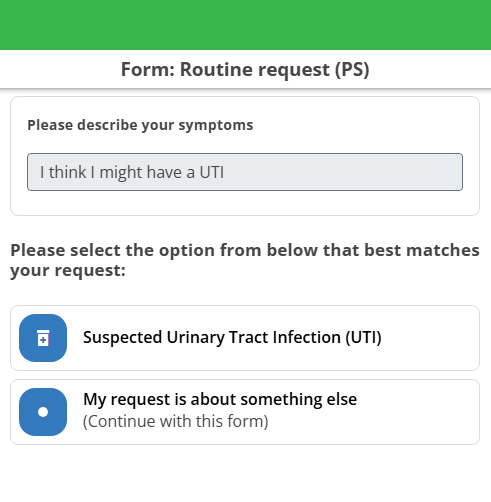
Alternatively, the patient is free to continue with their current form by selecting the 'My request is about something else' option if they'd prefer.
Important notes:
We will only signpost patients to forms that have been set up for signposting (see section below) and only if your practice have set one of those forms to be used in one of your custom action buttons.
We will respect any availability settings that you have in place, so patients would not be signposted to a form if the associated custom action button was not currently available for your patients (e.g outside of your usual opening hours).
Available pathways
The following pathways are currently available to be activated for patient signposting:
 Suspected UTI
Sick/Fit note requests
Dermatology
Hay fever
With more to come in the future!
|
 How can I access this feature?